The cocktail hour sits in a strange spot on your wedding day timeline. Your guests are relaxed and happy. The formal part is over. Real moments happen everywhere at once — at the bar, by the florals, around the appetizer stations. And your hired photographer is often somewhere else entirely.
This guide covers how to plan cocktail hour photo coverage from the couple's side: what to aim for, how to collect what guests capture, and how to browse everything after the day without chasing anyone.
Why the Cocktail Hour Is a Photography Gap
What your photographer is doing during this window
Right after the ceremony ends, most couples disappear for portraits. That session typically lasts 60 to 90 minutes — which is also exactly when your guests are at the cocktail hour.
Your photographer is not skipping the party. They are finishing the formal shots that take longer than expected: the couple's first look as married partners, bridal party groupings, and extended family combinations. These are booked shots that need to happen. The cocktail hour runs simultaneously.
Even if your package includes a second shooter, they are often covering venue details and decor during this window — not candid guest moments. And with one shooter split across the bridal party and the cocktail hour, full coverage of both is difficult.
The result: the cocktail hour often has the thinnest professional coverage of any part of the day.
What guests capture that pros miss
Your guests are living in the moment. They photograph the grazing table before it is half-eaten. They catch the first moment two old friends spot each other. They get the genuine reaction when someone tries the signature cocktail for the first time. No direction. No posing. Just real.
These moments are completely natural — and completely fragile. They exist in real time, and then they are gone. The only record is on someone's phone.
Unless you collect them, they stay there. A few will get texted to you. Most will not make it out of the camera roll. That is the coverage gap: moments that only exist on guest phones unless you actively gather them.
What to Aim for in Cocktail Hour Photos
Planned shots worth coordinating
You do not need to hand a shot list to your guests. But it helps to think through what you would want covered — so you know whether you are getting it.
The shots that matter most during a cocktail hour:
- Guest arrivals — the first moments as people step in from the ceremony, still emotionally open from what they just witnessed
- Candid conversations — groups catching up, kids running around, grandparents sitting together, reunions happening organically
- Food and drink details — the grazing table, signature cocktails, the bar setup, the detail work that catering and florals spent weeks on
- Floral arrangements and decor — these look best at the very start of the cocktail hour, before the crowd moves through
- First reactions to the venue — genuine expressions when guests step into the reception space and see it for the first time
None of these require directing your guests. They happen on their own. Your job is to collect the results.
Lighting and timing considerations
Outdoor cocktail hours that start near sunset can fall into golden hour — the 30 to 45 minutes before the sun sets when natural light turns warm, soft, and flattering. Whether this applies depends on your ceremony end time and the time of year. Check the sunset time for your specific date and location when you are planning.
Indoor cocktail hours work with different conditions. Venues with large windows give natural fill light that stays usable well into the evening. Chandeliers and candles provide warm ambient light. Both work well with modern phone cameras, which handle low-light situations better than cameras from just a few years ago.
One thing that consistently produces poor results: instructed group shots during cocktail hour. If you ask guests to line up or take a specific photo, you will get stiff results. The best candid shots come from guests who are genuinely caught up in a moment — not trying to fulfill an assignment.
How to Collect All Guest Cocktail Hour Photos in One Place
Most couples spend the weeks after the wedding chasing photos on WhatsApp. Someone texts a few shots. Someone else says they will send more later and forgets. The rest stay on phones indefinitely. There is a simpler approach.
Set up a shared album before the day and give guests a single place to drop everything. No individual sharing. No hunting through group chats.
 Guests join the shared album instantly by scanning a QR code — no app to download, no account to create.
Setting up a shared album with a QR code
sync.camera lets guests join a shared wedding album by scanning a QR code. There is no app to download. No account to create. They scan, and they are in.
Print the QR code and place it at the cocktail hour entrance — or put it on table cards so guests see it the moment they arrive. A small sign near the bar or the food station also works well. Anywhere guests naturally pause gives them a moment to scan.
Once a guest is in, any photo they upload goes directly into your private album. Guest uploads appear in the gallery as they come in. You can see them in real time from your phone.
Privacy-first: no guest accounts, no ads
Guests who upload photos are not signing up for anything. Their photos go into your private gallery — not a public feed, not a platform's photo index. No ad tracking. No third-party data sharing.
On the free plan, up to 7 guests can join the album. Paid plans remove that limit so your full guest list can participate without hitting a cutoff. All uploads land in a single private gallery. Only the people you invite can see it.
Wedding photos include people who did not opt into a public platform. A private photo album keeps that control with you, not with an app's advertising model or terms of service.
Setting Up Your Wedding Album Before the Day
Set up your sync.camera event a few days before the wedding — not the morning of. A few days gives you time to test the QR code, confirm everything looks right, and fix anything without stress before the day arrives.
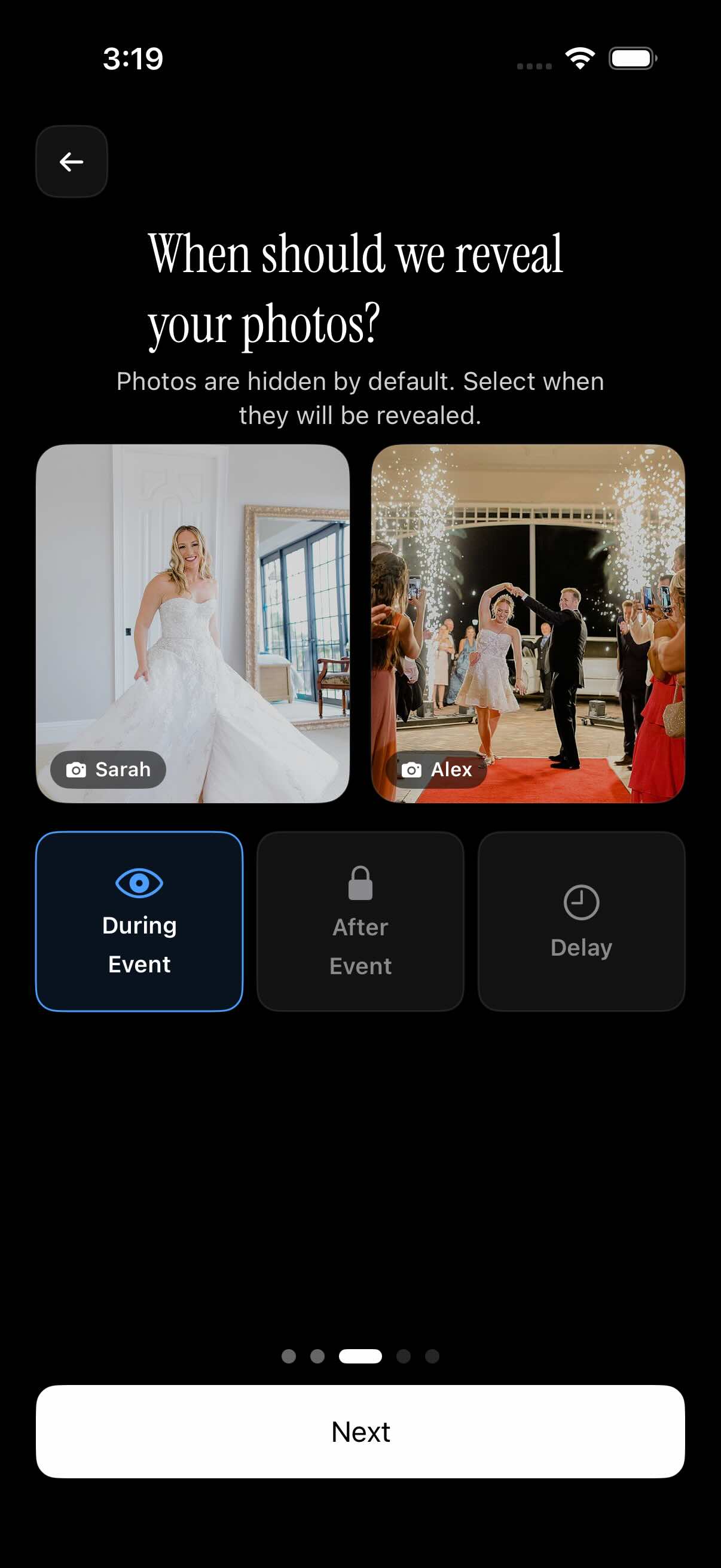 sync.camera's reveal settings let you choose when guests can see the photos — live during the event, after it ends, or on a date you pick — so the moment of discovery feels intentional.
Choosing the right event date window
When you create your event on sync.camera, you set a start time and an end time. Photos taken outside that window are not accepted for upload.
Set the window to cover both the ceremony and the cocktail hour. A 6-hour window starting at ceremony time works for most weddings — for example, if your ceremony starts at 3pm, set the event from 3pm to 9pm. That covers the ceremony, cocktail hour, and most of the reception.
If you also want photos from the rehearsal dinner the night before, extend the window to cover that time, or create a separate event for it. The key is: if you want a photo collected, the time it was taken needs to fall within your event window.
Do not set too narrow a window. Guests take photos in the parking lot, during venue setup, and right up until the reception ends. A wider window catches everything.
Controlling when photos become visible
sync.camera has three gallery reveal modes:
- During the event — guests see uploads in real time as they come in. Good if you want a live photo display running during the reception, or if you want guests to browse each other's shots during the evening.
- After the event ends — the gallery unlocks when your event window closes. Good for a surprise reveal the morning after, when you and your partner can see everything together.
- After a custom delay — you pick a specific future date and time. Good if you want to review the full set before anyone else sees it, or want to share the reveal with family a few days later.
Choose based on how you want the experience to feel. Live sharing keeps guests engaged during the reception. A delay turns the album into something to look forward to after the honeymoon.
After the Cocktail Hour: Browsing and Saving Your Collection
The cocktail hour ends. The reception begins. Somewhere in between, 30 guests have taken 200 photos. Here is how to go through them without losing your mind.
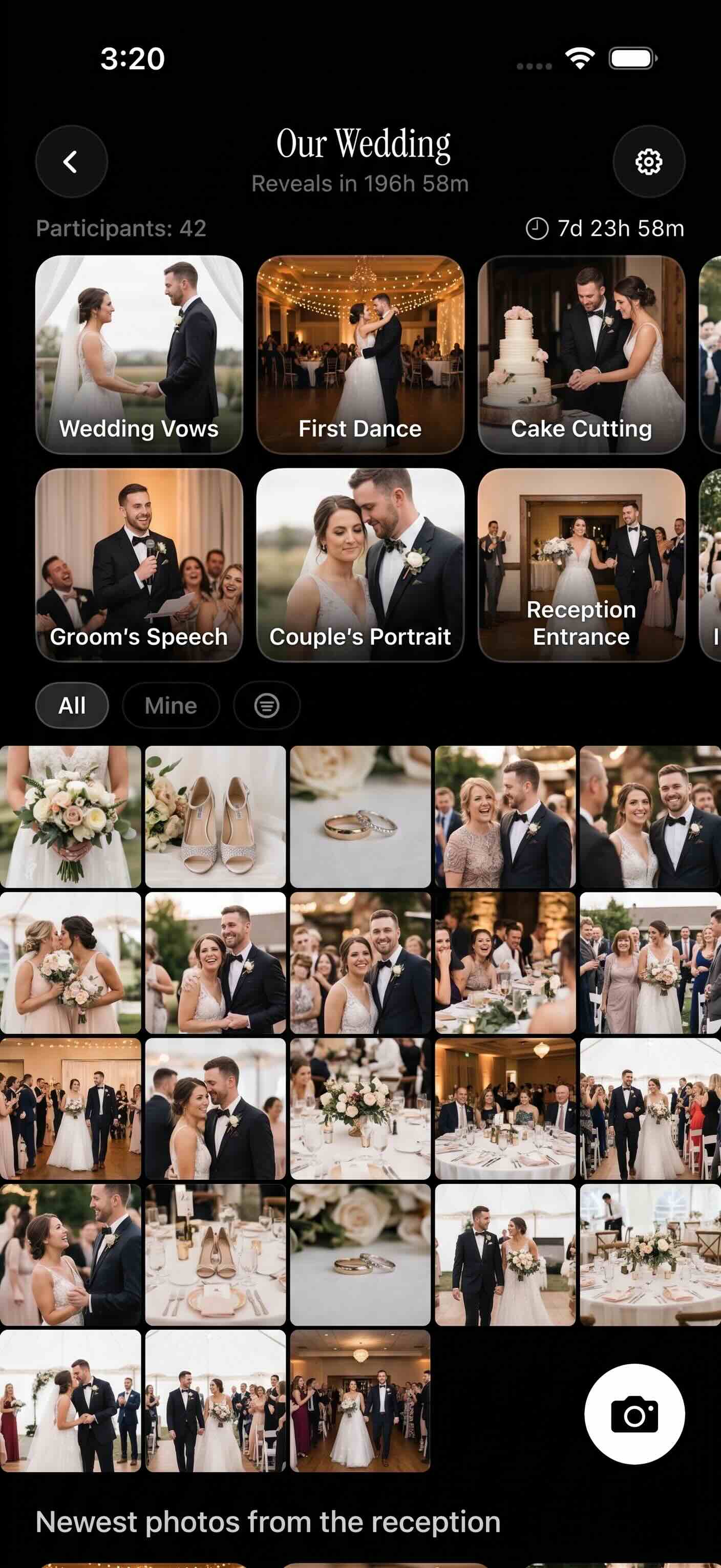 The shared gallery brings every guest upload into one view — no chasing, no group chats, just a complete picture of your day.
Filtering photos by who took them
sync.camera lets you filter the gallery by contributor. If you want to see everything your maid of honor shot during the cocktail hour, or find out which guest captured that moment with your grandmother, you can browse by person.
This helps in two ways. It gets you to the best shots faster — you know which guests were in the right place at the right time, so you can go straight to their uploads. It also helps you handle duplicates. If five people photographed the same toast, filtering lets you compare just those five rather than scrolling through 200 photos to find them.
The filter-by-photographer view makes a large collection of guest uploads feel navigable instead of overwhelming.
Downloading your favorites
Download individual photos or the full album set at any time after the event. The shared gallery does not disappear after 24 hours or after the event window closes. It stays available so you can come back when you are actually ready to look through everything.
A practical approach: do not try to review all the guest uploads the day after the wedding. Give yourself a week or two. Then sit down with your partner, filter by contributor, and mark the ones worth keeping.
Once you have your favorites shortlisted, you can share the gallery link with immediate family who want to see the full collection — without making the album public. They get access to the same private gallery. Nobody outside the invite list sees it.
Everything your guests captured during the cocktail hour is in one place, waiting for you when you are ready.