
Couples look for alternatives to wedding photographers when they want more candid coverage from the people actually living the day with them. A professional photographer can handle portraits, ceremony coverage, lighting, editing, and dependable delivery; guest-photo tools are different. They help collect the informal angles that usually stay buried in camera rolls, group chats, and social posts.
The strongest alternatives to wedding photographers in this category are not full replacements. They are candid-coverage supplements: QR guest-photo galleries, live wedding guestbooks, private shared albums, and cloud-photo tools that make it easier for guests to contribute photos and videos.
This ranking favors low-friction collection, private sharing, clear export options, and wedding usefulness. Qrowd Pics, Wed.tv, Picsui, GuestCam, Amazon Photos, and sync.camera all approach that job differently.
We picked tools that can help couples gather wedding photos from guests without turning the wedding into a tech-support project. The most important criteria were guest friction, QR or link-based joining, privacy posture, cross-platform access, live or delayed sharing controls, moderation or reveal controls, export options, and whether the product is specifically shaped around weddings.
We also weighted family-friendliness and practical event fit. A tool that works in a browser with no guest account is easier for mixed-age guest lists. A tool with documented private albums, moderation, or delayed reveal gives couples more control. None of these options should be treated as a substitute for the creative direction, portraits, editing, reliability, or liability coverage of a professional wedding photographer.
Qrowd Pics - best wedding-specific QR gallery
Qrowd Pics is the most wedding-specific option in this set. Its wedding page is explicit about using a QR code or link so guests can upload wedding photos and videos without downloading an app or creating a guest account: Qrowd Pics weddings.
It ranks first because the documented wedding workflow is unusually complete: guests can contribute from any device, paid tiers include unlimited uploads, uploads can stay open for 6 months, downloads stay available for 1 year, and hosts can download the collection as a ZIP. Premium also documents optional approval before uploads become visible.
Choose Qrowd Pics if the main job is collecting guest photos and videos around one wedding with a simple QR gallery. It is still a guest-capture tool, not a replacement for a photographer's portraits, lighting, editing, timeline coverage, or creative direction.
Pros
- Wedding-specific page documents QR or link sharing with no app downloads or guest signups: https://www.qrowdpics.com/weddings
- Paid tiers document unlimited uploads, 6-month upload windows, 1-year download windows, and one-click ZIP export: https://www.qrowdpics.com/weddings
- Premium documents optional upload approval before photos appear in the shared gallery: https://www.qrowdpics.com/weddings
Cons
- The free tier is limited to 20 uploads, a 1-day upload window, and a 3-day download window: https://www.qrowdpics.com/weddings
- It is focused on guest uploads and shared galleries, so couples still need a professional photographer for directed portraits, ceremony reliability, and edited deliverables.
- Its public wedding page centers on the wedding gallery workflow; couples wanting a broader live event album with multi-phase reveal timing may prefer sync.camera's documented moments and reveal modes: https://sync.camera
sync.camera - best privacy-forward live event album
sync.camera is the best fit when privacy, live sharing, and low guest friction matter more than wedding-only packaging. Its site documents one QR code, a shared album that fills in real time, iOS and Android apps, browser joining from an invite link, no guest account requirement, and albums that are private to the event: sync.camera.
Its strongest wedding use case is candid collection across phases of the day. Moments let hosts split an event into stages such as ceremony, reception, and after-party, each with its own QR code and reveal timing. Reveal modes can show photos live, after the event, or after an added delay.
The honest tradeoff is that sync.camera is less wedding-specific than Qrowd Pics or Wed.tv. Its public pages do not document wedding extras such as printable guestbooks, hosted livestreaming, or long post-event upload windows, so it belongs below Qrowd Pics for couples who want a wedding-first package.
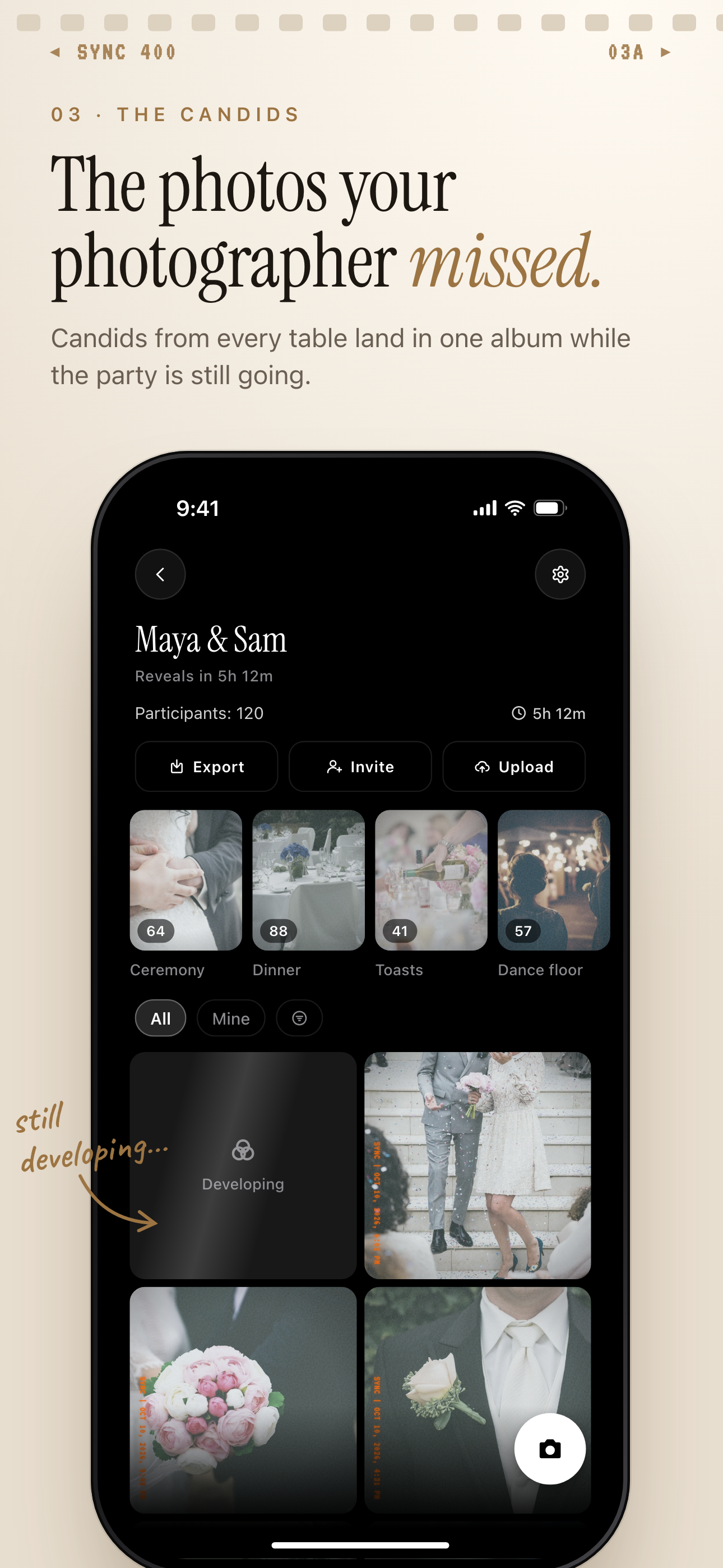
Guest candids land in one shared album, split into moments of the day like ceremony and dinner.
Pros
- Documents iOS and Android support, QR or invite-code joining, unlimited photos, and event-private albums: https://sync.camera
- Guests can join from a modern phone browser without creating an account: https://sync.camera
- Documents live sharing, end-of-event reveal, delayed reveal, and event moments with separate QR codes: https://sync.camera
- Privacy policy says sync.camera does not sell data, run third-party advertising, or use analytics SDKs that track users across apps or websites: https://join.sync.camera/privacy
Cons
- Less wedding-specific than Qrowd Pics and Wed.tv because the public site positions it for birthdays, weddings, parties, conferences, reunions, and meetups rather than only weddings: https://sync.camera
- The public site does not document printable wedding guestbooks or hosted livestreaming; Wed.tv and Picsui document those more directly: https://wed.tv/cast/ and https://picsui.com/
- The public site documents creating an event with an end time, but does not document a 6-month upload window or 1-year download window like Qrowd Pics: https://sync.camera and https://www.qrowdpics.com/weddings
Wed.tv - best for a live wedding guestbook
Wed.tv is strongest when the couple wants guest photos plus a live wedding guestbook experience. Its page documents QR-based collection of photos, videos, and messages with no app and no login: Wed.tv Cast.
It also documents live display on a TV or projector, shared mobile gallery viewing, moderation before content appears, and downloads as a gallery, printable PDF, or ZIP. That makes it especially useful for receptions where the screen display and guest messages are part of the experience.
Wed.tv ranks below sync.camera here because its public page is more focused on wedding guestbook and live-display workflows than privacy posture. For couples who prioritize a documented no-ads and no-third-party-tracking policy, sync.camera has clearer public privacy language.
Pros
- Documents QR collection of wedding photos, videos, and messages with no app and no login: https://wed.tv/cast/
- Documents live display on a TV or projector and a shared mobile gallery: https://wed.tv/cast/
- Documents moderation plus gallery, printable PDF, and ZIP downloads: https://wed.tv/cast/
Cons
- Its public page emphasizes wedding guestbook, live screen, and download features more than detailed privacy architecture: https://wed.tv/cast/
- Couples who only want a quiet private album may not need printable PDFs, live display, or message collection.
- It is a supplement for guest-generated content, not a replacement for a photographer's directed coverage or edited image set.
Picsui - best for receptions with screens or remote guests
Picsui is a strong choice when the reception experience includes a screen, remote guests, or a more production-oriented event flow. Its site documents QR uploads for photos, short videos, voice notes, and live slideshow moments without requiring an app: Picsui.
It also documents approval controls, live slideshows, bulk ZIP download, digital guestbook replay, and Live Broadcast via a private link. The wedding pass is documented as a one-time option covering 2,000 guest photos plus short video clips for one wedding.
Picsui ranks fourth because its broader event and professional-event positioning may be more than some couples need. The site also documents lead capture, guest emails, analytics, and pro workflows, which can be useful for photographers and venues but may feel heavier than a simple private wedding album.
Pros
- Documents QR uploads for photos, videos, voice notes, and reception slideshow moments without an app: https://picsui.com/
- Documents live slideshow, approval controls, and bulk ZIP download: https://picsui.com/
- Documents Live Broadcast for remote guests through a private link with no app or account required: https://picsui.com/
- Documents a Wedding Pass covering 2,000 photos plus short video clips for one wedding: https://picsui.com/
Cons
- Its public page includes lead capture, guest emails, analytics, and pro-event workflows, which may be more operational than some couples want: https://picsui.com/
- Live Broadcast pricing is not included in every plan; the site says Studio includes streams and Pro can add streaming per event: https://picsui.com/
- Like the other guest-capture tools here, it does not replace professional photography for portraits, ceremony coverage, editing, or timeline management.
GuestCam - best simple private event gallery
GuestCam is a straightforward private event gallery built around QR or link uploads. Its page documents guests scanning a QR code or opening a link to upload photos and videos from their phone with no app download and no account creation: GuestCam photo sharing.
It is especially strong for couples who want one place for every guest photo and a simple export path. GuestCam documents one private event album, organization by day, moment, or group, visibility controls, review controls, and original-quality ZIP download.
GuestCam ranks fifth because it is clear and practical, but the cited page is broader event-photo-sharing content rather than a deeply wedding-specific package like Qrowd Pics or a live wedding guestbook package like Wed.tv.
Pros
- Documents QR or link uploads with no app download and no account creation: https://guestcam.co/photo-sharing
- Documents private event albums for photos and videos: https://guestcam.co/photo-sharing
- Documents organization by day, moment, or group plus one-click original-quality ZIP download: https://guestcam.co/photo-sharing
- Documents controls for who can upload, who can view, and whether uploads appear instantly or after review: https://guestcam.co/photo-sharing
Cons
- The cited page positions GuestCam across weddings, parties, and corporate events, so it is less wedding-specific than Qrowd Pics' dedicated wedding page: https://guestcam.co/photo-sharing and https://www.qrowdpics.com/weddings
- The page says dedicated QR platforms are typically paid services, so couples should verify current package pricing before choosing: https://guestcam.co/photo-sharing
- GuestCam collects guest perspectives; it does not replace a photographer's professional portraits, lighting, editing, or event coverage responsibility.
Amazon Photos - best if you already use Prime
Amazon Photos is the most general-purpose option in this list. Amazon documents unlimited photo storage for Prime members, 5 GB of video storage included, access across devices, sharing by text, email, or social media, and shared groups for full-resolution photos, videos, or albums with up to 50 others: Amazon Photos.
It can make sense if the couple already uses Prime and wants a familiar cloud-photo place to store or share selected wedding albums after the event. It is not built primarily as a wedding guest-upload flow, though, and it does not document QR table-card collection, wedding reveal timing, moderation, or event-specific guest workflows in the cited source.
Amazon Photos ranks last for this use case because the storage value is strong, but the event-collection workflow is weaker than wedding QR tools. Use it as a storage or sharing layer, not as the main way to gather candid wedding photos from a large guest list.
Pros
- Prime members get unlimited photo storage and 5 GB of video storage included: https://www.aboutamazon.com/news/amazon-prime/how-to-use-amazon-photos-storage
- Amazon documents access across devices and sharing photos or albums by text, email, or social media: https://www.aboutamazon.com/news/amazon-prime/how-to-use-amazon-photos-storage
- Shared groups can share full-resolution photos, videos, or albums with up to 50 others: https://www.aboutamazon.com/news/amazon-prime/how-to-use-amazon-photos-storage
Cons
- It is a general cloud-photo product rather than a wedding-first guest capture tool: https://www.aboutamazon.com/news/amazon-prime/how-to-use-amazon-photos-storage
- The cited Amazon source does not document QR-code guest uploads, wedding-specific moderation, reveal timing, or printable guestbook downloads.
- Video storage is limited to 5 GB with Prime before paid storage upgrades: https://www.aboutamazon.com/news/amazon-prime/how-to-use-amazon-photos-storage
| Criterion | Qrowd Pics | sync.camera | Wed.tv | Picsui | GuestCam | Amazon Photos |
|---|---|---|---|---|---|---|
| Guest friction | QR; browser upload; no app | QR; no app or login | QR/link; no app or account | QR/link; no app or guest signup | QR/invite; browser join; no guest account | General sharing flow; not QR wedding collection |
| Privacy posture | Private links and host controls documented | Private wedding experience stated; less detailed in cited page | Private albums and visibility controls documented | Shared wedding gallery; verify policy separately | No ads, no third-party tracking, event-private albums | Cloud-photo account sharing; not wedding-specific privacy controls |
| Wedding-specific fit | High | High | Medium-high | High | Medium-high | Low |
| Cross-platform access | Browser-based guest flow documented | Smartphones, tablets, and desktop documented | Phone QR/link upload documented | Any device upload documented | iOS, Android, and browser guest joining | Across devices documented |
| Live sharing | Live slideshow documented | Live TV/projector display documented | Instant or reviewed visibility controls documented | Shared gallery documented | Real-time shared album documented | Sharing documented; not live event display |
| Reveal or moderation controls | Approval controls documented | Approval before screen/gallery display documented | Instant or review-before-visible controls documented | Premium approval documented | Live, after-event, and delayed reveal documented | Not documented for wedding guest uploads |
| Download/export | Bulk ZIP download documented | Gallery, printable PDF, and ZIP documented | Original-quality ZIP download documented | One-click ZIP and full-resolution downloads documented | Export favorites documented | Album sharing and storage documented |
| Photo and video support | Photos, short videos, and voice notes | Photos, videos, and messages | Photos and videos | Photos and videos | Photos on product page; photos and videos referenced in privacy policy | Photos and videos; Prime includes 5 GB video storage |
| Free or one-time pricing | One-time Wedding Pass documented | Pricing linked; verify current plan details | Paid-service expectation stated; verify current pricing | Free tier plus one-time paid tiers documented | Free to start; upgrade per event documented | Included with Prime for unlimited photo storage |