Every event ends the same way. The photos are on a dozen different phones, scattered across group chats, and nobody ever gets around to pulling them together. You asked people to share their shots. A few did. Most didn't. The moment is gone.
Sync.camera shared albums fix this in one step. Create an event album, share one QR code, and every guest's photos land in one place — automatically, without anyone needing to install an app or create an account. You stay in control of the album and decide exactly when the gallery opens.
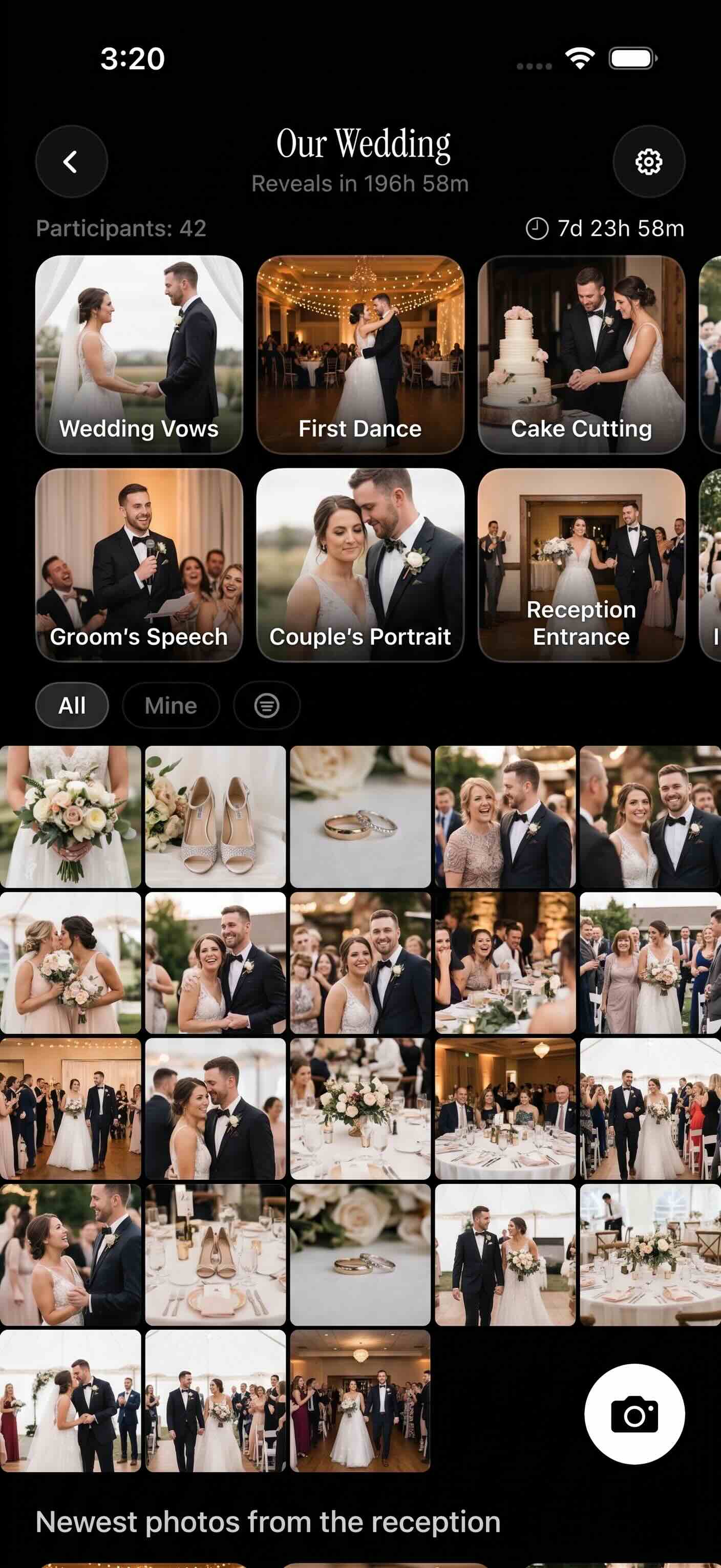
Every guest's photos land in one shared event album.
How Shared Albums Work on sync.camera
Create your event album
Start by creating an event album on sync.camera. Give it a name, set a schedule window for the event dates, and you're ready. The date-bounded schedule matters: only photos taken within that window are eligible to upload. Old camera-roll shots can't slip in by accident, and the album stays focused on the occasion.
Share the QR code with guests
Next, share the QR code with your guests — print it on a table card, project it on a screen, or send it in a group chat before the event. Anyone who scans it can join the shared album and start uploading photos straight from their own phone. There's no app to install and no account to create. Up to 7 guests can join a shared album event for free.
Browse photos by photographer
As photos come in, you can browse the gallery filtered by individual photographer. Find every shot one person took without scrolling the entire album. Each contributor's photos are attributed, so everyone gets credit for what they captured.
Choose when the gallery goes live
The final step is what makes sync.camera different: you choose when the gallery becomes visible. During the event, right after it ends, or after a custom delay you set. Wedding couples can hide the photos until after the honeymoon. Surprise party hosts can keep the reveal intact until the guests of honor are ready. Most shared album tools show photos the moment they're uploaded — sync.camera gives you the choice.

Who it is for
Wedding couples
Place a QR code at each table so every guest's candid shots land in one shared album — then set a gallery reveal for after the honeymoon so the surprise holds until the couple is ready.
Birthday party hosts
Collect photos from every guest's phone into a single album and reveal the full gallery after the party ends — no hunting through group chats or asking people to AirDrop files.
Families at reunions
Relatives of all ages scan a code and contribute without creating an account — grandparents get the complete family album without anyone having to text individual files afterward.
Friend groups on trips
Everyone shoots on their own phone during the trip and photos land in one shared album, sortable by photographer, so nothing gets missed and no one is stuck being the designated photo-sender.
Features
QR-code joining
Guests scan a single QR code to join the shared album and start uploading — no app installation or account creation required.
Controlled gallery reveal
Pick when photos go visible: during the event, immediately after, or after a custom delay you set — keeping surprises intact.
Date-bounded uploads
Only photos taken within the event's scheduled window are eligible to upload, so old shots from a camera roll cannot accidentally clutter the album.
Filter by photographer
Browse the shared album by individual contributor so you can find every shot one person took without scrolling the entire gallery.
Free tier for small events
Shared album events with up to 7 guests are free — no credit card needed for a family birthday or small gathering.
Privacy-first access control
The album is not public by default. Access is gated by the QR code you share, keeping photos away from anyone you did not invite.
Frequently asked questions
Do guests need a sync.camera account to add photos to a shared album?
No account is needed. Guests join by scanning the QR code you share and can upload photos directly from their phone without signing up for anything. This removes the biggest friction point at real-world events — you can't control which apps people have installed, but everyone can scan a QR code.
How many guests can join a shared album for free?
Up to 7 guests can join a shared album event at no cost, with no credit card required. If you're hosting a larger gathering — a wedding, a company event, a big family reunion — paid plans are available and allow more guests to contribute photos with unlimited upload capacity. Visit the pricing page for current plan details.
Can I hide photos until after the event is over?
Yes. sync.camera gives you three gallery reveal options: photos become visible during the event as they're uploaded, immediately after the event window closes, or after a custom delay you choose. The delayed reveal is especially useful for weddings — couples can set the gallery to open after the honeymoon so they experience the photos fresh, rather than having everything surface during the reception.
What stops guests from uploading photos that have nothing to do with the event?
The date-bounded schedule handles this automatically. When you create an event album, you set a date range for the occasion. Only photos taken within that window are eligible to upload — so guests cannot pull old shots from their camera roll and add them to the album, whether by accident or on purpose. The album stays focused on the event itself.
Is there an upload limit per guest?
Free events include upload limits per guest, while paid events allow guests to contribute unlimited photos. If you want every attendee to share everything they shot without hitting a cap, a paid plan covers that. See the pricing page for the current limits on each plan.