Everyone is gathered, but you still need to get them into the same photo event. Show the big QR code on your sync.camera invite pass so guests can scan and join from their phones while you are together.
Guests can join from any modern phone browser without creating an account or installing an app. If scanning is inconvenient, share the invite link or eight-character invite instead. Joining and viewing photos are separate: your event's reveal timing determines when photos become visible.
How the big QR code invite works
Create an event, give it a name and choose its end time. Then show the event invite pass to the guests gathered with you.
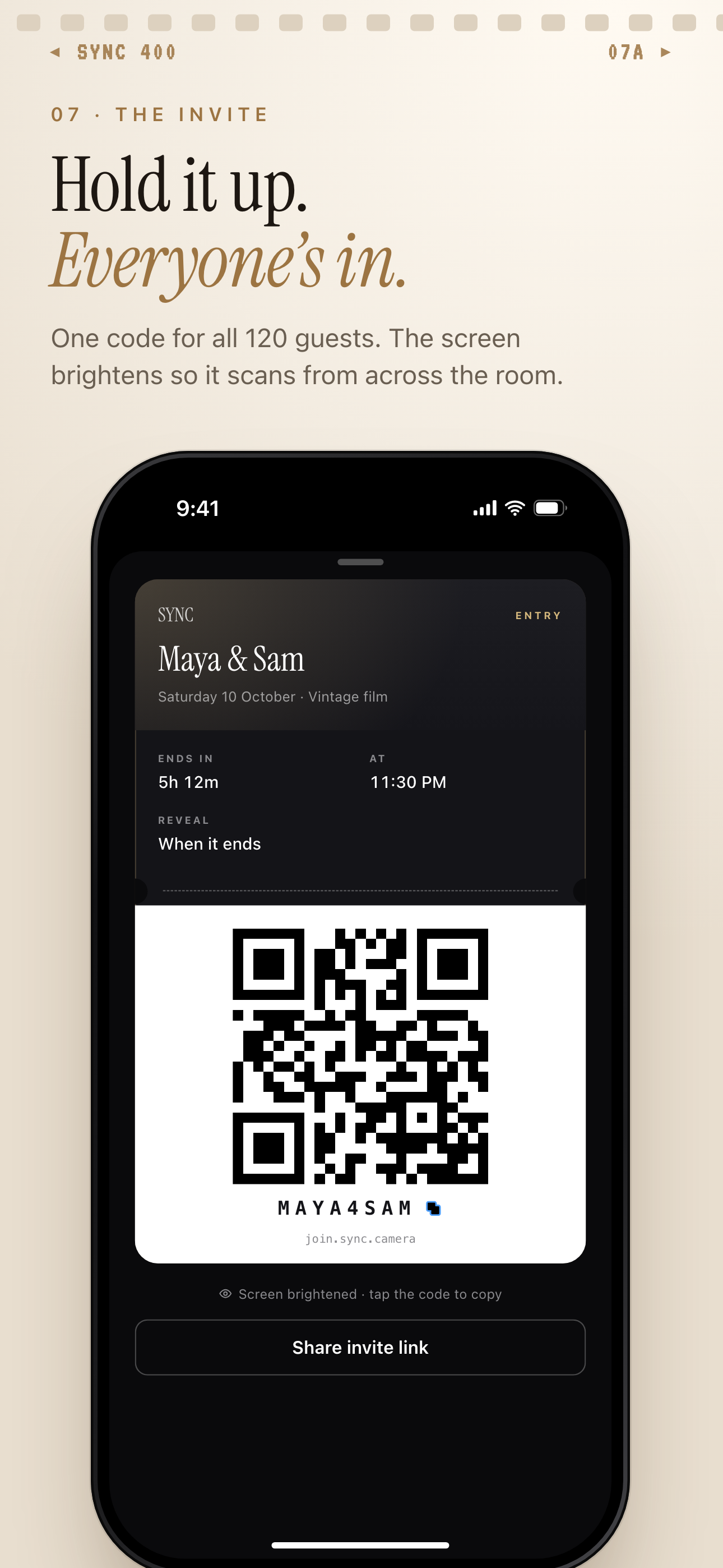
Use the wedding invite-pass screenshot below as a guide: Large QR code — the code guests scan to join; Eight-character invite — an alternative way to join; Share invite link button — the option for sharing the invitation as a link. The wedding event details shown are examples.
Guests scan the QR code to join from a modern phone browser. No account is required. Installing the iOS or Android app is optional; the apps add better camera controls and push notifications for new photos.
If a guest cannot scan, or a companion is arriving separately, share the invite link or eight-character invite. These are alternative ways into the same event. Scanning the code does not change when the gallery unlocks; that follows the reveal setting you choose.
Who it is for
Wedding hosts
Show arriving guests the wedding event invite pass so they can scan the QR code and join from their phones.
Birthday hosts
While friends are gathered for the birthday celebration, hold up the QR invite so they can join without creating accounts.
Travel group organizers
Show the QR invite when the group meets, then share the invite link with companions arriving separately.
Features
Large QR code on the invite pass
Show the event invite pass with its large QR code, eight-character invite and Share invite link button.
Browser-based guest joining
Guests can join from any modern phone browser without creating an account. Installing an app is optional.
Alternative ways to join
Share the invite link or eight-character invite when showing or scanning the QR code is inconvenient.
Separate invites for Moments
Split an event into stages, each with its own QR code and reveal timing.
Your choice of reveal timing
Show photos live during the event, unlock the gallery when it ends or unlock it a set number of hours afterward.
Frequently asked questions
Do guests need an account or the sync.camera app?
No account is required, and guests can join from any modern phone browser via the invite link. The optional iOS and Android apps add better camera controls and push notifications for new photos.
What if a guest cannot scan the QR code?
Share the invite link or eight-character invite instead. Both provide alternative ways to join the event, including when a guest is not there to scan the code in person.
Does scanning the code make photos visible immediately?
Scanning lets a guest join; photo visibility follows the event's reveal setting. During lets guests see photos live as they are taken, while After the event unlocks the gallery when the event ends. Additional delay unlocks it a set number of hours after the event ends.
Is there a free tier?
The free tier supports up to 7 guest uploaders per event. SYNC PRO is a one-time purchase, not a subscription, that expands the guest and photo limits for a single event. Upgrade again only when you create a larger event.
Can different parts of an event have their own QR codes?
Yes. Moments split an event into stages, such as the ceremony and reception, each with its own QR code and reveal timing. Guests move between them without switching apps.
How does sync.camera handle photos and data?
sync.camera does not sell your photos or data, run ads or use cross-app tracking. Photos are encrypted in transit, stored in event-scoped buckets and protected by per-event access controls.