How to Use This Free Wedding Planning Checklist
The full checklist is right here on this page. There's no email gate, no PDF download, and no signup form standing between you and the list.
Why this checklist has no email gate
Most "free" wedding checklists trade a download for your inbox. This one doesn't ask for anything. Read it, bookmark it, come back to it — that's the whole deal.
How the timeline is organized
The checklist is broken into five stages, in the order most couples move through them: 12+ months out, 6-8 months out, 1-3 months out, wedding week and day-of, and after the wedding. If you're already past a stage, skip ahead — you don't need to read from the top to use this.
12+ Months Before: The Foundational Decisions
This far out, three decisions shape everything else: how much you'll spend, roughly who's invited, and where and when it happens.
Set the budget first
Set the budget before you talk to a single vendor. It's the decision that determines the other two — guest count and venue options both flow from what you're willing to spend, not the other way around. A rough split most couples work from:
- Venue and catering (usually the largest single line item)
- Photography and videography
- Attire for both partners
- Flowers and decor
- Music or entertainment
- A buffer for the things you haven't thought of yet
You don't need exact numbers in every category today — you need a total, and a sense of which categories matter most to you, so you can overspend on those and cut elsewhere. If the total is tighter than you'd like, cutting costs without it feeling cheap is its own skill, and it's easier to apply now than after deposits are down.
Draft a rough guest list
Draft a rough guest list before you go venue shopping. You don't need final numbers yet, but a ballpark headcount narrows which venues can actually hold your wedding, so it has to come before you tour anywhere. Sorting names into "definitely," "would like to," and "if budget allows" tiers now makes it much easier to trim later without hurting feelings.
Book the venue and lock the date
Book the venue once budget and guest count give you a range to search in. Popular venues — and Saturdays in peak season especially — are often booked 9-12+ months out, so this is not a step to leave for later if you have a specific place or date in mind. Before you sign anything, confirm what's included in the contract (tables, chairs, setup/teardown time, a backup plan for weather if you're outdoors), and ask what happens if you need to reschedule.
6-8 Months Before: Vendors, Attire, and Deciding How You'll Capture Guest Photos
With the venue locked, this stage is about booking the people and things that take the longest lead time — and making one decision older checklists tend to skip.
 Setting up the guest QR code is a planning-stage task, not a day-of scramble — it belongs on this month's list, not next week's.
Booking photographer and videographer
Book your wedding photographer and videographer now. The in-demand ones get booked close to a year out, and by 6-8 months before, your date may already be gone from their calendar if you wait longer. When you meet with candidates, ask to see a full gallery from one wedding (not just highlights), confirm how many hours of coverage the package includes, whether a second shooter is included, and how long after the wedding you'll get your photos back.
Choosing and ordering attire
Order the wedding dress or suit with enough lead time for alterations. Many dresses take months to arrive before a single stitch of tailoring even starts, and alterations themselves can take several fittings spread over weeks. This is also a reasonable time to loop in the bridal party and groomsmen about their attire, so everyone has time to order and get fitted before the final weeks get busy with everything else.
Deciding how guests will share their own photos
This is also the point to decide whether you want more than your hired photographer's shots. A wedding photographer captures the posed moments and the big shots — but not the candid moments happening at your cousin's table or in the parking lot before the ceremony. If you want those too, this is when to plan for them, not the week of the wedding.
SYNC (sync.camera) is built for exactly this gap. A host creates an event and invites guests with a QR code; guests join from their phone's own browser, with no account to create and nothing to install. Anyone who can scan a code and tap a link can start contributing photos to the shared event. See how it works for weddings specifically on sync.camera's wedding photo-sharing page, including how bridal party members can add their own candids to the same event.
1-3 Months Before: Locking In the Details
The big bookings are done. Now it's about paperwork, timing, and making sure everyone else knows the plan.
Send invitations and track RSVPs
Mail invitations roughly 6-8 weeks before the wedding. That window gives guests enough notice to plan travel while leaving you time to chase RSVPs and firm up your final headcount for caterers and seating.
Build the day-of timeline
Build a minute-by-minute timeline for the day itself: hair and makeup, ceremony, photos, and reception. Share it with every vendor — a timeline only you have doesn't help the caterer know when to start plating. Include buffer time between blocks; hair and makeup running fifteen minutes long shouldn't cascade into a late ceremony.
Handle the legal paperwork
Apply for your marriage license within whatever window your state or country requires before the wedding. That window — and any waiting period after you apply — varies by location, so check directly with your local clerk's office or equivalent registrar rather than assuming a national standard. Do this early enough that a delay doesn't put your paperwork at risk.
Wedding Week and Day-Of: The Checklist Nobody Finishes Early
This is the stage where the list gets shorter but the stakes feel higher. Everything here is about making sure the day runs without you having to manage it.
 A guest scanning the event QR code and joining straight from their phone — this is the moment the whole setup from 6-8 months ago was for.
Reconfirm every vendor
Reconfirm arrival times and contact details with every vendor 3-5 days before the wedding. It's a short phone call or email, and it catches the rare scheduling slip while there's still time to fix it.
Delegate a day-of point of contact
Delegate a day-of coordinator — a planner if you hired one, or a trusted, organized friend if you didn't. You want someone besides the couple fielding "where do I park" questions during the ceremony. Give that person the vendor contact list, the timeline, and the authority to make small calls without checking with you first.
Set up guest photo collection before guests arrive
Set up the guest photo QR code before the event starts, not during it. You want it ready and printed or displayed the moment the first guest walks in, not something you're troubleshooting on your phone mid-ceremony.
SYNC's Moments feature lets you split the day into stages — getting ready, ceremony, reception, after-party — each with its own QR code, so photos land in the matching part of the guest photo gallery instead of one undifferentiated pile. Reveal timing is also a choice you make as the host: photos can show up live as guests take them, stay hidden until the event ends, or unlock after a set delay, depending on how much you want to see during the day itself.
After the Wedding: Thank-Yous, Photo Roundup, and Keepsakes
The wedding is over, but the checklist has a few items left, and they're easy to let slide.
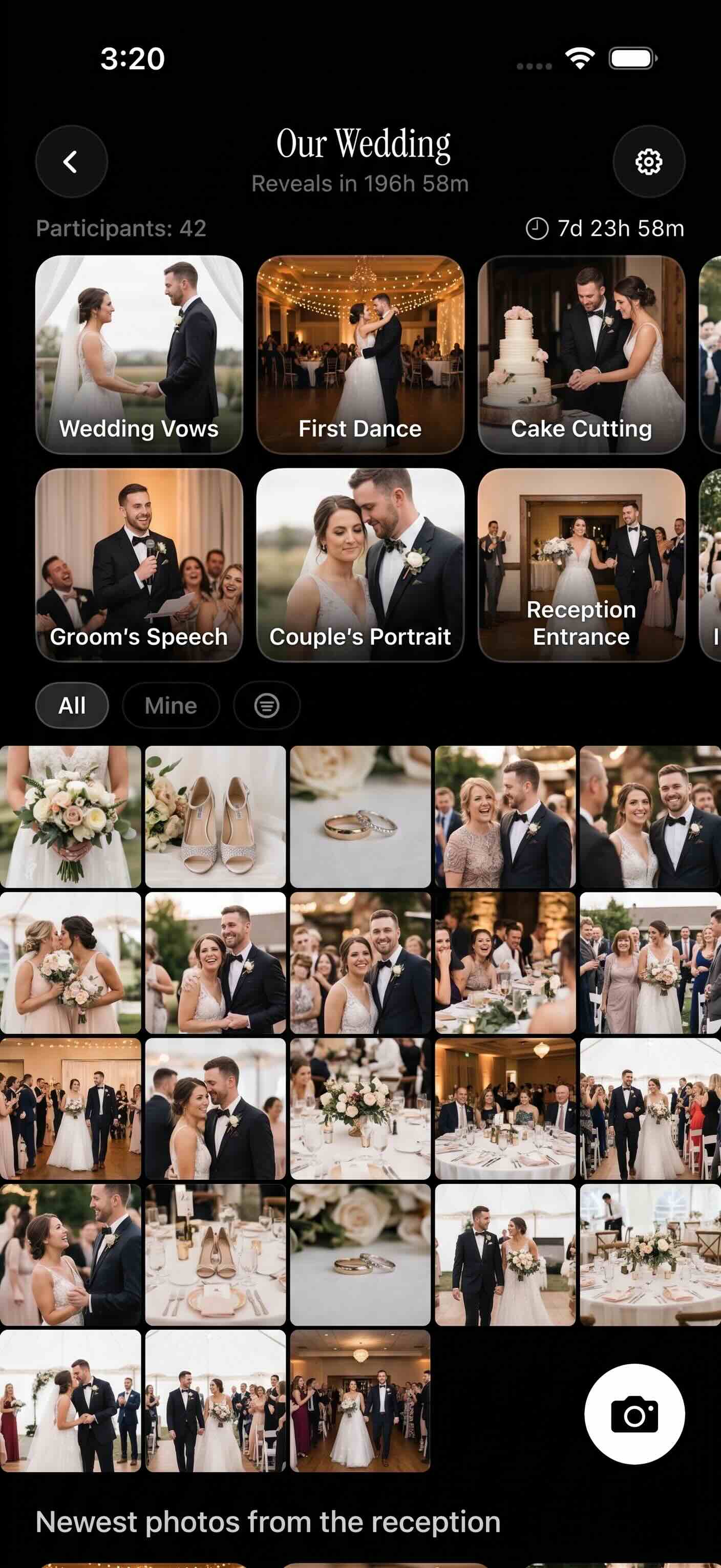 Every guest's photos landed in one gallery instead of a dozen separate camera rolls and group chats — this is the payoff of setting the QR code up in advance.
Send thank-you notes
Send thank-you notes within 2-3 months of the wedding. For gifts you received before the day — engagement or shower gifts, for instance — send those sooner rather than batching everything at the end. A short list of who gave what, kept as RSVPs and gifts come in, saves you from reconstructing it from memory afterward.
Collect every guest's photos into one gallery
Consolidate every guest's photos into a single shared gallery instead of chasing individual phones and group chats after the fact. This is the step the QR code setup from wedding week was for: if guests joined the event, their photos are already collected in one place rather than scattered across everyone's camera rolls.
On sync.camera's free tier, hosting an event needs no account, and up to 7 guests can scan in and upload without one either — enough for a lot of casual gatherings, though most weddings will want more room. SYNC PRO is a one-time purchase, not a subscription, that raises the guest and photo limits for that single event when you need to open uploads to your whole guest list; you can start an event free to see how far the free tier gets you before deciding. The company is also specific about what it doesn't do with the photos it holds: no ads, no cross-app tracking, and it doesn't sell photos or data.
Turn favorites into a keepsake
Once the gallery is complete, pull your favorites into a printed photo book or a guest-book-style keepsake built from the collected photos — a different kind of memento than the album your photographer delivers, because it includes the moments only your guests were standing close enough to catch.